Profiles basics
AppArmor profiles are the fundamental building blocks of system security. They act as a set of rules that dictate exactly what a confined application is allowed to do.
Profile overview
Here is a visual overview of a profile structure:
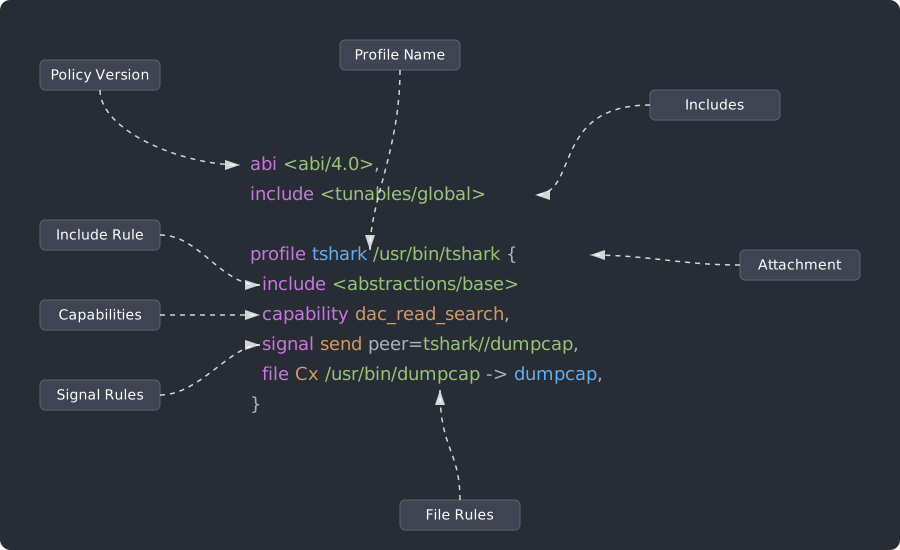
At a high level, an AppArmor profile consists of two main components:
- The Header: Defines the context and application of the profile. It typically includes:
- ABI: The Application Binary Interface version targeted by the profile.
- Profile Name & Attachment Path: Establishes which executable the policy applies to.
- Flags: Modifies how the profile operates (e.g., configuring it in
complainorenforcemode). - Includes: Shared variables or reusable rules included from other files.
- The Rules: Enclosed within a block of curly braces
{ ... }, the rules dictate the actual access controls and permissions granted to the confined application (such as file or network access).
Rules are responsible for defining what a confined application can and cannot do.
It is possible to define rules to restrict access to most kernel objects. The most common ones are:
- Files
- Network
- Unix
- Capabilities
- D-Bus
- Mounts
- Ptrace
- Signals
- Sockets
- IPC
- Mqueue
- io_uring
- Userns
Rules are generally written in the following format:
<rule_type> <rule_details>,
For instance, a network rule to allow creating an inet socket can be written as:
network create inet,
A rule allowing the application to drop privileges can be written as:
capability setuid,
And a rule allowing read and write access to any file in the home directory can be written as:
file @{HOME}/** rw,
As shown in this example, the syntax supports the use of regex patterns and variables, allowing you to define complex rules concisely.
Note
File rules may omit the file keyword. The previous rule can also be written as: @{HOME}/** rw,
In order to create fine-grained profiles, AppArmor rules can be very precise, as demonstrated in the example below:
dbus (send) bus="system" path="/org/freedesktop/resolve1" interface="org.freedesktop.resolve1.Manager" member={SetLinkDNS,SetLinkDNSEx,SetLinkDomains,SetLinkDefaultRoute,RevertLink},
By defining precise rules, it is possible to create very granular profiles that only allow the necessary operations for an application to function, therefore massively increasing the security of the system.
In the section below, you can find a more details about each sections of a profile. For the full rules and profiles reference, you can see the apparmor.d manual page
Profile definition
Profiles are text files usually stored in /etc/apparmor.d/. While the file can be named anything, conventionally, its name represents the profiles it contains. For example, /etc/apparmor.d/firefox is a file that contains an AppArmor profile for Firefox.
The convention is to have one profile definition per one file, but profile files may contain multiple profile definitions. One profile per one file convention simplifies package management, but it is not technically enforced. There might be cases where having multiple definitions in one file is advisable especially if profiles are closely related.
Profile definitions start with a path of a binary that the profile applies to or with a profile keyword.
Profile names
The string that follows profile is a profile name.
Profile names may not begin with the :, ., or + characters. If there are whitespaces, the name must be in quotes.
Profile types
Attached profiles
The attachment is the path(s) of binaries that a profile is automatically applied to once the profile is loaded into the kernel.
If a profile name starts with /, it will be interpreted as an attached profile and will apply automatically to a program of the same name:
 profile /usr/bin/firefox {
    # profile rules
 }
The profile keyword may be omitted for attached profiles:
/usr/bin/firefox {
   # profile rules
 }
The attached profile will be automatically applied by the kernel every time a process executes /usr/bin/firefox.
If there is no attachment defined, the profile will not automatically apply. However, you can still manually apply it with aa-exec to confine programs.
Unattached profiles
Unattached profiles start with the profile keyword that is followed by a profile name. These profiles will not be automatically applied by the kernel and require manual application. They are often used for contained helper programs, sandboxing, and container namespaces.
Examples of unattached profiles declarations:
profile firefox {
  # profile contents
 }
profile "firefox profile" {
  # profile rules
 }
Flags
Profile flags define various aspects of the profile's behavior . Flags are defined after the profile name with the flags=(flag1 flag2 flag3) directive.
List of flags can be separated by a comma , or a space .
Example:
/usr/bin/firefox flags=(complain) {
   # profile rules
 }
This profile is attached to the /usr/bin/firefox binary, and has a complain flag.
Modes
Mode is one aspect of a profile behavior that can be controlled with flags.
AppArmor has two modes -- enforce and complain.
Enforce mode
If a profile is applied in the enforce mode, the kernel will prevent the process from executing any forbidden operations per profile definition. Any violation attempts will also be logged.
The mode can be enabled with the enforce flag:
 /usr/bin/firefox flags=(enforce) {
    # profile rules
 }
No mode is enforce mode by default
If there is no flag specified, the profile is in enforce mode by default.:
/usr/bin/foo { }
Complain mode
If a profile is applied in the complain mode, the application will be able to perfom the forbitdden operations and only the violation attempts will be logged.
The mode can be enabled with the complain flag:
 /usr/bin/firefox flags=(complain) {
    # profile rules
 }
Switching modes at runtime
AppArmor supports changing mode without reloading the profile:
aa-complain /usr/bin/foo
aa-enforce /usr/bin/foo
Comments
Comments start with \#. Everything after \# is a comment except for \#include. Note that \#include contains no whitespace.
 #  Comment 1
 #  Comment 2

 profile example {  # comment 3
    # comment 4
    /home/foo rw,  # comment at the end of a file rule
 }
Includes
You can include other files in the profile definitions to reuse text segments.
Each include starts on a new line. You can define include with or without a hash sign #, both include and #include are valid, however, since comments are declared with the hash, it is recommended to avoid using it in includes for clarity.
Valid include directives:
#include <file>
include <file>
AppArmor follows the C include syntax, so includes must not contain a trailing comma ,, this is an invalid syntax:
include <file>,
include <file>
If using hash, # and include must not be separated by a whitespace, for example, this syntax would be interpreted as a comment by AppArmor:
# include
Abstractions
Abstractions are files that can be included in multiple profiles. They define common application tasks and can be reused in various contexts. They allow you to avoid writing the same rules in every profile, making profiles shorter and easier to maintain.
When defining abstractions, it is recommended to choose those that grant the least privilege necessary.
It is a common practice to create abstractions in two versions:
* a more restricted one ending with -strict (e.g. nameservice-strict)
* a broader version (e.g. nameservice)
Note that abstractions currently do not support declaring dependencies on variables defined in the tunables/ directory.
Some common abstractions include:
abstractions/base: basic accesses to things like system shared libraries that would be expected to be used by any program. Production profiles generally should include this.abstractions/nameservice: accesses required to resolve name resolution queries in a variety of situations (e.g. direct DNS queries, communicating with libnss-libvirt or kerberos, etc.).abstractions/nameservice-strict: accesses required for a much more limited set of name resolution queries, primarily by accessing files like/etc/resolv.conf. Try using this abstraction first before the more permissiveabstractions/nameserviceabstraction.abstractions/private-files: user private files that usually should not be accessed. This abstraction is useful as a carve-out for applications that may legitimately need to access files anywhere but that still would generally not be expected to e.g. write to files in@{HOME}/.bin.abstractions/private-files-strict: a more strict version of the above that also blocks accesses to e.g. SSH keys and FireFox browser configuration files.abstractions/python: accesses used by the Python runtime.abstractions/perl: accesses used by the Perl runtime.abstracitons/consoles: accesses used by TUI programs that use features of TTY consoles, such as shells.
You can specify a file in the include using an absolute or a relative path.
Absolute path:
include "/etc/apparmor.d/abstractions/<file>"
Relative path to the directory of the profile file:
include "abstractions/<file>"
Variables
Local variables
Variables are declared at the start of a profile file using the @{variable_name} syntax. Variables declarations must not contain trailing commas ,.
Variables can hold multiple values, and when referenced, all these values are included.
Single value assignment:
@{alphabet_string}=abcdefghijklmnopqrstuvwxyz
Multuple value assignment:
@{digits}=1 2 3 4 5
When @{digits} is referenced:
/var/cache/our_program/@{digits}/**
/var/cache/our_program/1/**
/var/cache/our_program/2/**
/var/cache/our_program/3/**
/var/cache/our_program/4/**
/var/cache/our_program/5/**
Variable appending:
@{hexdigits}=@{digits}
@{hexdigits}+=a b c
When @{hexdigits} is referenced, AppArmor interpets it as:
/var/cache/our_program/@{hexdigits}/**
/var/cache/our_program/1/**
/var/cache/our_program/2/**
/var/cache/our_program/3/**
/var/cache/our_program/4/**
/var/cache/our_program/5/**
/var/cache/our_program/a/**
/var/cache/our_program/b/**
/var/cache/our_program/c/**
Global variables
Global variables are defined in /etc/apparmor.d/tunables/global.
AppArmor is preconfigured with a selection of useful variables that represent common directories all defined in /etc/apparmor.d/tunables/. For examle, @{HOME} is defined in /etc/apparmor.d/tunables/home.
To use these variables, include a file from the tunable directory in your profile/
Special variables
@{profile_name} is a special variable that contains the name of the current profile.